Recording, Monitoring, and Latency with Bitwig Studio on NixOS
Over the past year, I've been making a concerted effort to learn more about digital audio production and explore some new musical horizons. It's been a steep learning curve, but I've enjoyed being a novice again. As with any endeavor to learn, the path is winding, and I recently found myself in a rabbit hole. I think I came out of it a little wiser, so I decided to document what I've learned here. The topic of interest is audio latency.
I first encountered latency a few weeks ago when experimenting with microphone recordings to find the best room for vocal recording. When I moved a few things into an office, grabbed a nearby set of headphones, and tested the sound, I noticed a severe delay. After some troubleshooting, I figured out that it was the headphones, which happened to be connected via Bluetooth. When I plugged in hard-wired headphones, the problem resolved instantly. I was surprised to learn that Bluetooth introduced that much delay since I use it routinely for phone calls and meetings, but I shrugged it off and moved on.
A week later, I started to become more aware of the same phenomenon while trying to record using an old laptop I'd repurposed for mobile recording. I wasn't conscious of this problem when I was recording using a more powerful computer, but this old laptop seemed to be struggling intermittently. It wasn't as bad as what I'd experienced with the Bluetooth headphones, but it still made recording prohibitively unpleasant. I started reading and, before I knew it, I was on a side quest.
What is latency?
When recording audio, there's a delay between the moment sound is produced and the moment the computer finishes doing whatever you've instructed it to do with that data. Each step the digital audio takes on its journey adds some time. Some steps like sound sound traveling through the air are so fast they're negligible. But some, like writing data to a slow hard drive, modifying a signal with a long chain of effects, or compressing the audio for transmission to a Bluetooth can take significantly longer. Every step the audio has to take in its journey adds to the delay between the production of the sound and its final destination. That delay is called latency.
Most of the time, latency is unimportant. In some situations, it doesn't matter at all! If you take a video during a concert and record it to your device's storage, there's a delay between when the epic like show strike yours camera and when the video is ultimately saved to your device's storage, but it doesn't matter. You are saving it to watch later, so it doesn't matter if it takes several seconds for that laser barrage to be twiddled permanently into bits. In other situations, it's easy to compensate for latency as long as it isn't too severe. If you're live streaming the concern to your huge social media following, no one will know or care if it takes a few seconds for the data to make its epic journey from your phone, through the internet, and to their phone. Even in interactive situations, most of us have learned how to have a phone conversation or video conference with a few hundred milliseconds of latency. It occasionally results in some awkward talking over each other, but we've adapted.
However, latency is not always negligible. What if you're trying to record a vocal track on top of a previously recorded piano track? If the vocal track is behind the piano track because of latency, it'll sound terrible. Or, what if you're in a live performance trying to play guitar with some effects added? If you pluck a string and the sound comes out of the speakers half a second later, you and your audience will be disoriented by the timing.
Latency is a phenomenon we experience more often that we think, but, when audio recording, it's one that we must understand and manage consciously.
Which, how much, and why?
This post will focus on buffer latency mainly because it's the largest source of latency in this setting. While it does take time for sound to travel through the air to a microphone, for an analog signal to travel down a wire, for an analog-to-digital converter to translate the analog waveform into a digital stream of data, for a digital-to-analog converter to translate the digital data back into an analog waveform, for that electrical signal to travel to some headphones, and for the sound to travel from the headphone to the ear, all that happens orders of magnitude faster (hundreds of microseconds) than buffering (ones to hundreds of milliseconds depending).
Buffering is necessary because of how computers work. As a simple example, say you want to use your computer to add a vocal effect like reverb and then play it through a speaker. One process running on a computer may be dedicated to collecting the signal from your audio interface. It then has to hand that signal to another process, which will modify the signal with the reverb effect. That process may then hand it to another process or perhaps back to the first process to send out to your audio interface where it will make its way to a speaker. However, just like your brain can't zap psychic thoughts directly into another person's brain, processes can't directly share data on the CPU. Instead, processes that share data do so through memory. One process copies data into memory and then the other process comes along and reads it later.
You might be thinking of saying to your computer, "Hey, you super-fast modern computer, quit dawdling and read that data right away so I can quit reading this blog post and get back to making music with negligible latency!" You certainly can do that. All you have to do is make the buffer size in your audio pipeline very small. Unfortunately, this is the recipe for a buffer underrun. Inevitably, the process that consumes the data will read the buffer before it has been completely populated by the process that supplies the data has filled it, and there will be a gap in the data stream. In audio, this manifests as distortion. The smaller the buffer, the more frequently buffer underruns will occur. If the buffer is far too small, the distortion will constantly obliterate the sound with unrecognizable crackling. If the buffer is barely too small, the distortion only occurs occasionally and sounds like small pops. Your computer is fast, but there's always going to be buffer latency when one process talks to another.
What can we do about it?
Searching the internet for latency mitigation techniques is the rabbit hole I just escaped, and it's a deep one. They primarily fall into two categories.
There are many ways to minimize latency so that it becomes negligible. These are techniques that decrease the likelihood of buffer underruns, thereby allowing you to run your audio pipeline with a smaller buffer. There are situations in which this is absolutely necessary such as live music production. Here are a few examples.
- Bouncing: When making a sick synth track, you had to maximize the buffer size so that chain of 42 effects would stop causing buffer underruns, but now the singer is pitching a fit because there's a half second of latency when he's listening to his voice while recording the vocal track. Bounce that synth track! This will record the synth and effects to a static audio track. Since the effects are baked in, the CPU just has to play this track straight. Then, you can decrease the buffer size and record the vocals with less latency.
- Software Optimization: Increasing the priority of your audio processes, killing unnecessary processes (like browsers!), ensuring your audio interfaces have optimal drivers, and learning some of the inner workings of your music production and audio software can allow you to decrease the likelihood of buffer underruns and run with a smaller buffer.
- Hardware Optimization: This all started for me because I tried to record using an old laptop with a CPU that had only two physical cores, which was the primary bottleneck. If your CPU is slow or only has a couple of physical cores, if system is out of memory and utilizing virtual memory, or if you're recording your audio to a slow HDD, a hardware upgrade may allow you to decrease your buffer size and run with less latency.
Otherwise, there are a few ways to circumvent the need for low latency entirely. This is great, but these approaches usually come with other tradeoffs.
- Direct Monitoring: Many audio interfaces have this feature, which combines the audio being recorded by the device directly with the audio being produced by the computer. This bypasses the latency that listeners would otherwise hear in the part that's being recorded, but the tradeoff is that what comes through the monitor is the raw audio with no effects or modulation.
- Editing: Is there a 430 millisecond delay in a recording that is otherwise great? Just use your music production software to shift it. Latency fixed!
Optimizing the System
This section will be more specific to my stack, which is:
- NixOS (channel 25.05, kernel 6.6.101-rt59), a Linux-based operating system
- Pipewire (v1.4.7), the current default audio engine packaged with most Linux distros
- Bitwig Studio (v5.2.7), music production software
When I started trying to decrease the latency I was observing, one of the first things I tried was running Bitwig Studio with a very high process priority. This was an absolute disaster and had the opposite of the intended effect, which lead me to investigating Pipewire, the audio engine that I was using. It turns out that this is the process that should be targeted for optimization, and everything else follows. To cut to the chase, lots of searching finally turned up an excellent recommended list of optimizations, which I'll summarize as follows:
- Enable real-time kernel capabilities.
- Disable kernel vulnerability mitigations that limit processing.
- Disable simultaneous multi-threading at the kernel level.
- Use CPU modes that favor performance over power conservation.
- Use an SSD instead of an HDD.
- Ensure the system is not memory constrained.
- Decrease utilization of swap/virtual memory.
- Disable daemons and other processes running in the background that aren't necessary (e.g. WiFi, Bluetooth, and browsers).
- Run the audio engine and critical applications with real time priority.
These apply generally to any audio workstation. If you're on Linux, I highly recommend rtcqs. It's an application that will quickly check most of these things (and a few others!) so that you don't have to figure out how to investigate each one individually.
Getting Pipewire started with full real-time scheduling turned out to be a bit tricky. There's a convincing discussion on this matter on Github, but the procedure described there didn't work exactly as prescribed, and the Pipewire logs didn't reveal much. Investigating the Pipewire source code revealed another important step, and that turned out to be the trick. To try to save anyone else from the same headache, I added a comment to the Github discussion and requested a change to Pipewire to provide a warning in its output.
In the end, here's my full low-latency.nix config.
{ config, pkgs, ... }:

{

  #Maximize performance
  powerManagement.cpuFreqGovernor = "performance";

  #Recommended for improved latency
  boot.kernel.sysctl = { "vm.swappiness" = 10;};

  #Better for realtime under high loads to keep cores dedicated
  #to high priority threads instead of sharing resources
  #But, devices that rely on logical threads (older CPUs)
  #may fail without this feature.
  security.allowSimultaneousMultithreading = false;

  #Enable realtime scheduling
  boot.kernelPackages = pkgs.linuxPackages-rt_latest;
  boot.kernelParams = [
    #Allow full preempting.
    #Not sure whether this is redundant with rt kernel.
    "preempt=full"

    #Disable kernel mitigations.
    #This is a security vulnerability, so it should
    #only be done on devices dedicated to audio!
    "mitigations=off"
  ];

  #Create the audio group and
  #add the user who'll be running pipewire with rt.
  users.groups.audio = {
    members = [ "tyler" ];
  };

  #Give the audio group some liberal permissions
  #Make sure the users of interest are added to this group!
  security.pam.loginLimits = [
    {
      domain = "@audio";
      item = "memlock";
      type = "-";
      value = "unlimited";
    }
    {
      domain = "@audio";
      item = "nice";
      type = "-";
      value = -20;
    }
    {
      domain = "@audio";
      item = "rtprio";
      type = "-";
      value = 99;
    }
    {
      domain = "@audio";
      item = "nofile";
      type = "-";
      value = 99999;
    }
  ];

  services.pipewire.extraConfig.pipewire."low-latency" = {
    "context.properties" = {
      "default.clock.rate" = 48000;

      #Probably don't want to go much lower than 128 or buffer overrun.
      #256 is a better default.
      "default.clock.quantum" = 256;

      #This is available but will likely fail.
      "default.clock.min-quantum" = 64;

      #Probably don't need to go much higher than this
      "default.clock.max-quantum" = 2048;
    };

    "module.rt.args" = {

      #Very low value resulting in very high priority
      "nice.level" = -19;

      #Very high value resulting in very high priority
      "rt.prio" = 88;

      #Disable this limit
      "rt.time.soft" = -1;

      #Disable this limit
      "rt.time.hard" = -1;

      "rlimits.enabled" = true;

      "rtportal.enabled" = false;

      #Could optionally enable as a fallback.
      "rtkit.enabled" = false;

      "uclamp.min" = 0;

      #This is in a lot of the examples. Is this the absolute max?
      "uclamp.max" = 1024;
    };
  };
}
After restarting the Pipewire daemon, a quick look at htop proves that Pipewire is running with the process priority and niceness values configured above, and that it spawns its child processes and many of Bitwig's child processes with similarly high priorities.
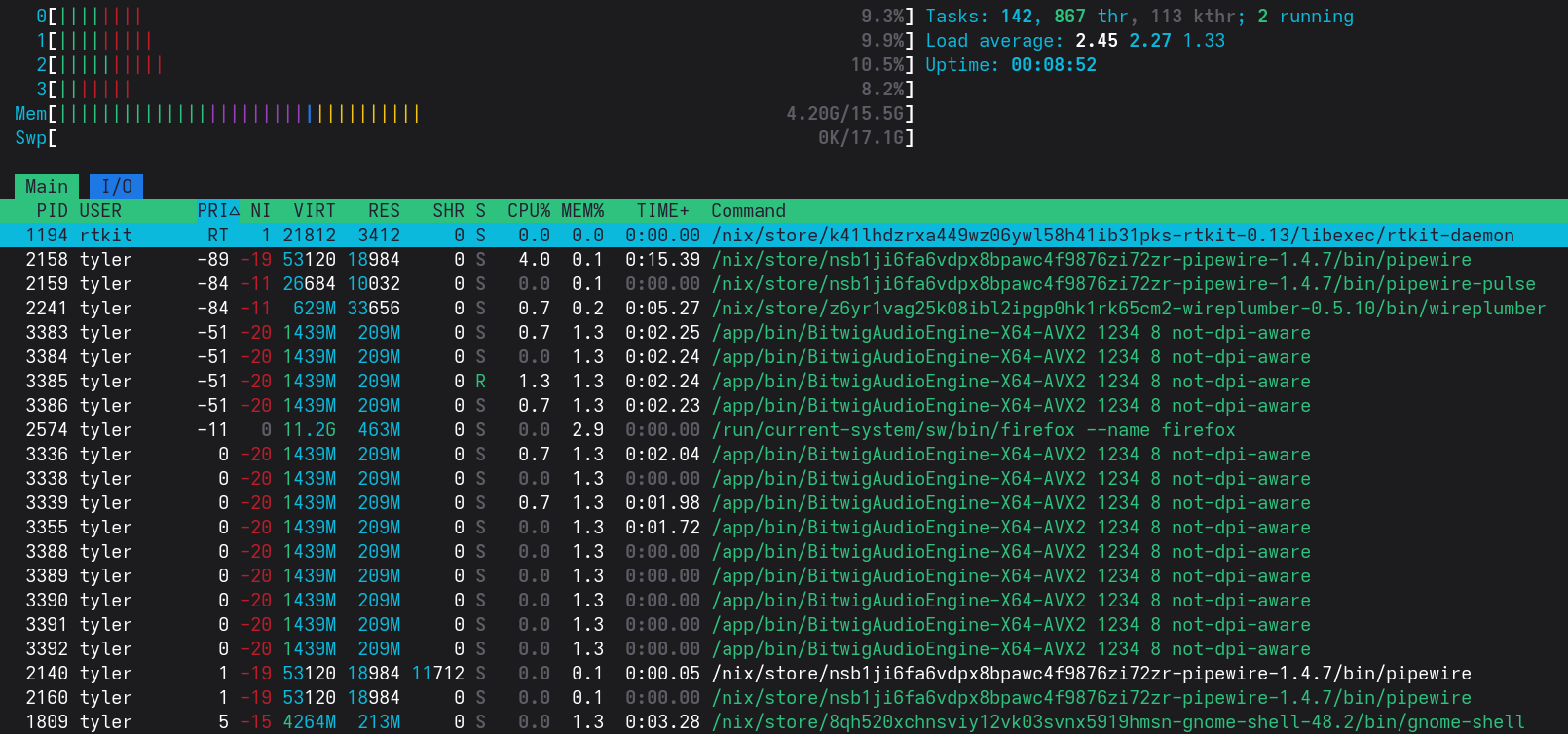
It's worth noting that Firefox claims a relatively high priority and an intermediate niceness. This is just another indication that we should really close our browsers and other unnecessary applications when we're attempting low-latency audio work.
Pipewire has lots of great monitoring features if you know how to find them, and they are terribly enlightening. Let's take a look at pw-top, which will show a continuous display of the sinks and sources connected through Pipewire.

The Pipewire manual tells us what all this means, but there are a few fields worth mention.
- QUANT tells us about the size of the buffer for that device.
- RATE tells us about the sample rate in Hz.
- To calculate the length of time for a buffer in seconds, we divide QUANT by RATE. So, decreasing QUANT or increasing RATE will increase the probability and frequency of buffer underruns.
- ERR is the count of buffer underruns.
- FORMAT tells us about the format of the data stream. Above, S32LE presumably means signed 32-bit little endian.
- WAIT is how long a node waits for data before beginning processing.
- BUSY is how long a node takes to actually perform its processing.
There are other tools such as pw-profiler if you want to collect longitudinal data and pw-cli if you want to investigate your audio pipeline in more depth, but I found the snapshot provided by pw-top sufficient for my purposes.
Understanding Bitwig Settings
Alright, the system is optimized. The system kernel has real time capabilities enabled, and Pipewire is running with high priority. But what about the settings in Bitwig? There's a section in Settings > Audio that sure seems pertinent here.

Block Size seems similar to QUANT, and Sample rate seems similar to RATE. What happens if we change these settings?


The changes we made are now visible in Pipewire, but, curiously, the sample frequency of the Focusrite Scarlett Solo doesn't match! But if I unplug it and plug it back in...

Both the output and input streams adjust to the different sampling rate. I would guess this is either a deficiency in the deice driver or in Pipewire, but it's something I'll need to keep in mind if I ever change Sample rate.
Loopback Testing
So, how do changes in these values actually impact latency? Scouring the forums left me with several useful thoughts, rules of thumb, and anecdotes, and pw-top spouts lots of numbers at us. But, nothing beats a test, and a loopback test may be useful to confirm how the software actually behaves. To this, I'll use the following very complicated, extremely high-tech configuration:
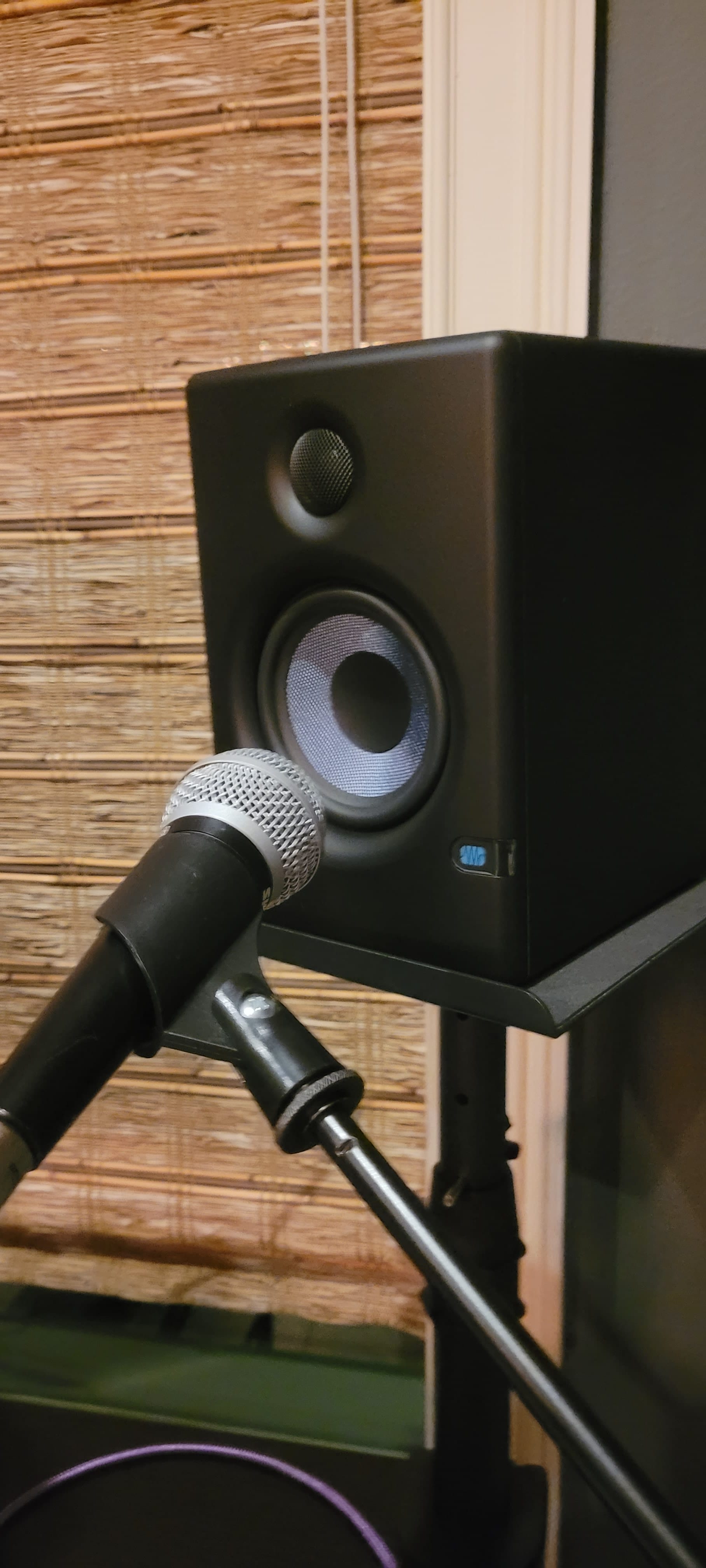
When recording, we're worried about the delay that occurs between when we make a sound and when that sound finally makes it to our ears. In this test, we'll have Bitwig produce a periodic through the speakers and send the recording of that sound back to Bitwig, where it will be recorded. Although we start the path in a different place, we traverse all the same steps, so it should be an equivalent measure of the system's latency.
Let's start with a large Block size of 2048.

At this Block size and Sample rate, Bitwig tells us to expect a buffer latency of 42.67 ms. Checking pw-top confirms the pipeline is running with these settings.

I enabled the metronome, set the audio channel to record but disabled the monitor (to avoid feedback), and started recording. Afterwards, I opened the sample, selected the interval from the beginning of the beat (when Bitwig's metronome makes a sound) to the beginning of the signal from the microphone (marked automatically by Bitwig as an audio event, which is indicated by the blue arrow at the right of the selected region). Once selected, the inspection panel tells us the length of this inspected time is 21 ms.
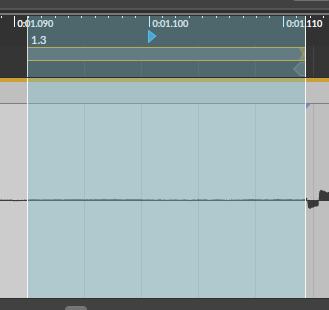
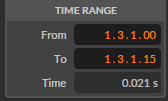
Result with a QUANT of 2048
This doesn't seem right. As Bitwig says in its settings menu, we expected a latency of 43 ms from the buffer alone, but the measured latency is only 21 ms!
Here's a screen capture of pw-top during the test.

The sum of the whole WAIT column is just barely under 1.2 ms. Adding all the BUSY values doesn't even get us to 2 ms in total. It is apparent that while pw-top may give some insight into the delays in the pipeline, it clearly doesn't quantify all latency. But Bitwig didn't record with the expected latency, so something seems wrong.
Let's try a lower QUANT.

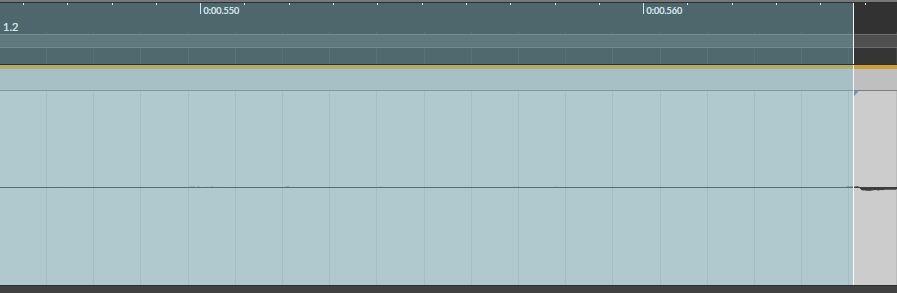
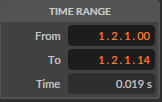
This result is nearly identical, so something is certainly wrong with the test. I was worried the direct metronome output might be insufficient, so I recorded the audio to a source track and enabled the monitor on the sink track. This also makes it easier to see the delay between the produced sound and the recorded sound. I also enabled the monitor of the sink but set the volume very low to avoid feedback.

Still no significant change in the measured latency. I even tried stressing the source and sink tracks with some random effects.



The latency increased by 4 ms with the effects chains, but this clearly isn't an accurate measure of the latency I was observing that started this whole investigation. Subjectively, that latency seemed closer to 100 ms.
I did a quick sanity check. I grabbed the microphone, switched to headphones, cranked the monitor for the sink track, and talked into the mic at the QUANT values of 256 and 2048. There was a clear, distinct difference in latency between the two. Just to check my observation, I set QUANT to 2048, armed the recording track, and recorded myself making percussive sounds in the microphone with the metronome. I could hear significant latency in the monitor as I recorded, but when I looked at the recorded waveforms, the latency had returned to near 20 ms!
The forums and Reddit discussions often talk about Bitwig compensation for its calculated latency. This must be what's happening. But, the assertion, "What you hear through the monitor is what is recorded," is clearly false. This test proves that, at least with the version of Bitwig I'm using, the buffer latency is necessarily present in the monitor output but it compensated in the recorded audio.
The above Reddit discussion also mentioned the Audio recording latency compensation setting in Bitwig. Let's disable that and do one more test at at QUANT of 2048.


And there is the expected latency of 107 ms. This is very useful to know! Obviously, I immediately re-enabled this setting. I am sure there's some setting in which it should be disabled, but I don't expect I'll encounter it in my endeavors.
Before finishing this test, I've wanted to investigate the Recording offset setting as well. Most of the forum discussion states this is to impose a manual correction for latency that Bitwig is unable to compensate automatically such as a device that is reporting an incorrect latency. Since we've observed a latency of about 21 ms throughout this test, I'll set it to -21 ms to see if the remaining latency is negated.
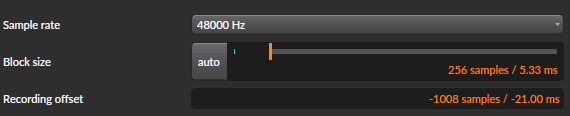

Oops, the latency went up to 43 ms. Negative values will shift the final recording in the earlier direction. Let's try +21 ms.


The final latency in the recording is nearly nothing. That's handy! We've learned another useful tool. Incidentally, here's a deep dive about this setting that also uses loopback testing that helped to inspire and inform this section.
Sampling Frequency Tradeoffs
The Nyquist frequency with a sampling rate of 48 kHz is 24 kHz. The upper boundary of human hearing is somewhere in the 20kHz range, so you're capturing most audible sounds with a sampling rate of 48 kHz. There may be some situations in which I will opt for a higher sampling frequency. For example, if I ever find myself recording a classical music concert, then I might do that. But, for the studio work I have planned, latency is a much greater enemy that inadequate bandwidth, so I'll probably stick with 48 kHz for my applications.
Conclusions
I'm glad I did these tests because they clarified some misconceptions I had about how I should record. The big lessons I learned are:
- Bitwig will compensate for buffer latency, so using the direct monitor feature on my audio interface with a large buffer size to avoid underruns is the best approach to monitoring when timing is critical.
- In situations where timing is less important than hearing effects through the monitor, I should decrease the buffer size to decrease the latency I hear in the monitor. I should be aware that the monitor output will not be corrected for buffer latency, but that final recording will be corrected.
- I have 20 ms of uncompensated latency in my audio pipeline. This is not insignificant, and I'm not sure what's causing it! For now, I will make more use loopback testing and Bitwig's Recording offset setting to compensate, but this will be an interesting avenue of future investigation. (Update: Investigation Complete!)
Happy recording!
